Domains
/
Custom domains
Custom domains
Every service gets a managed HTTPS URL, but production usually needs your own domain. Adding one takes two steps: claim it on the service, then prove you control it with a DNS record.
4 min read
Adding a domain
Open the service, go to its Domains tab, and add the domain you want it to answer on.
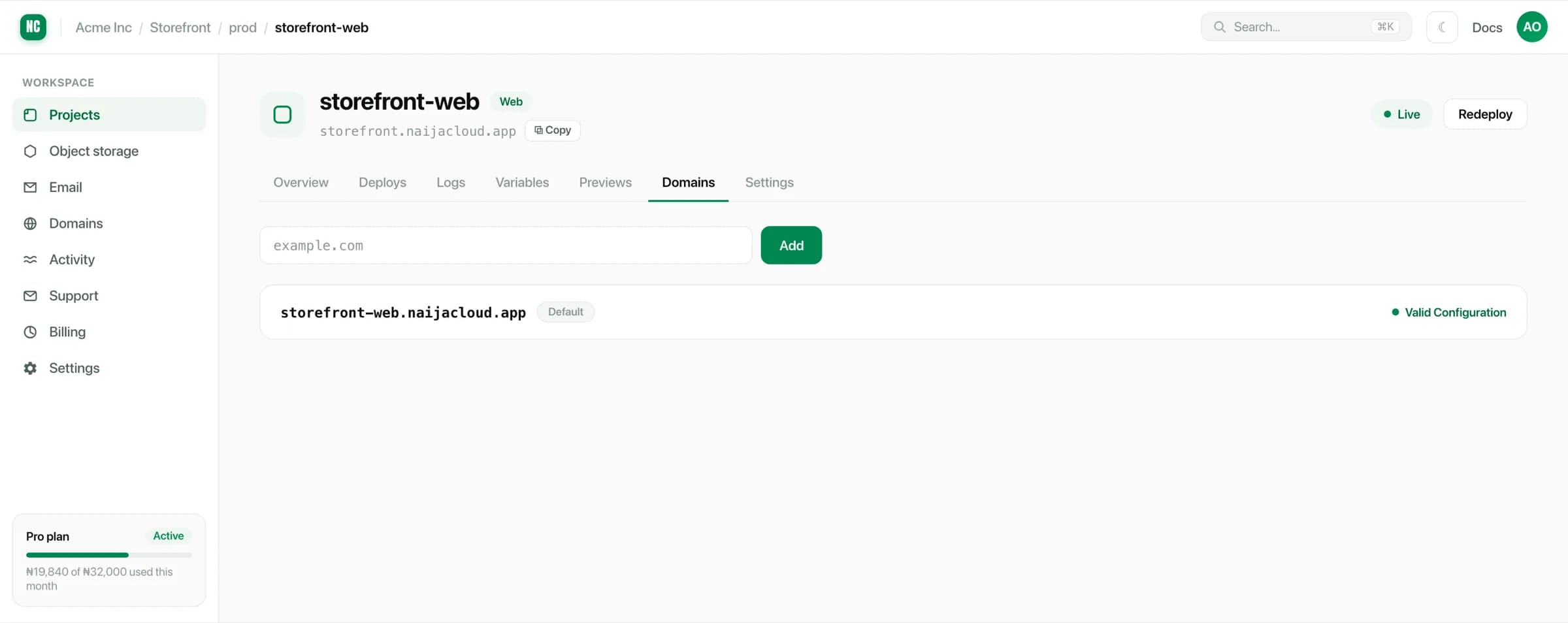
You are then shown the DNS record to create. Until that record resolves, the domain stays pending. We will not serve a domain we cannot prove you control.
Creating the DNS record
Add the record at whatever manages your domain's DNS. If the domain is registered with Naijacloud, that is the Domains section of your workspace. See DNS records.
Records propagate on their own schedule. Most resolve within minutes, though a stale cached record can take longer, up to the previous record's TTL.
Lower the record's TTL before you change it, if you can. A record cached for 24 hours keeps serving the old value for 24 hours after you fix it, and there is nothing to do in the meantime but wait.
HTTPS
Once the domain verifies, a certificate is issued and renewed for you. There is no certificate to upload, and nothing to remember to renew.
Verification has to complete first: certificate issuance depends on the same DNS proving the domain points at us.
If a domain sits at issuing for a long time, the cause is nearly always DNS: a record on the wrong name, a typo, or a second conflicting record left over from a previous host. Check what the name actually resolves to before assuming the certificate is at fault.
Root domains and subdomains
Both are supported: example.com and app.example.com can each point at a
service. The record type differs between them, so use the value shown for the
domain you added rather than copying between them.
A common arrangement:
| Domain | Points at |
|---|---|
example.com | The marketing static site |
app.example.com | The web service |
api.example.com | The API service |
Removing a domain
Removing a domain stops the service answering on it. Traffic to it fails until you point it elsewhere, so remove it after you have moved it, not before.